ItemOptix V1 to V2 Portal Upgrade Steps
Upgrade Phases
1. Pre-Requisites (Before Upgrade)
Prior to scheduling the V2 upgrade, the following prerequisite must be completed:
- Network Whitelisting
- Ensure all required V2 Portal URLs and services are whitelisted within customer network and security controls.
- Application Upgrade
- Upgrade all ItemOptix mobile applications to version 2.2.1 or later.
- SAML Configuration (If Applicable)
- Complete SAML registration and validation with the V2 Portal before production cutover.
- MDM Policy Validation (If Applicable)
- Verify Mobile Device Management (MDM) policies and configurations are compatible with the mobile application and portal environment.
2. Configuration & Upgrade
Upgrade Activities
- Checkpoint upgrades users from V1 to V2.
- Portal configurations and data are copied from V1 to V2.
- Sanity checks are performed.
Planned Upgrade Window
- The V1 to V2 upgrade process requires approximately 2 hours to copy portal configurations and data.
- During this upgrade window:
- No Portal Administrator configuration changes should be made.
- No user feed updates, synchronization activities, or offline sync operations should be performed.
- Users should avoid making configuration changes that may impact the upgrade process.
3. V2 Pre-Production Exploration
- Customers receive access to the V2 pre-production environment.
- User testing and validation activities are performed.
- Issues are reported through existing support channels.
- SAML, MDM, connectivity, and workflow validations are completed prior to production upgrade.
4. Production Rollout
- V2 Portal becomes the default production environment.
- Continued support is provided through existing ItemOptix support channels.
- Optional access to the V2 pre-production environment will remain available for testing purposes (where applicable).
Post-Upgrade Actions
- Clear Cache
- Clear the ItemOptix mobile application cache.
- Clear the browser cache before logging in to the V2 Portal environment.
- Update Bookmarks
- Verify and update any saved browser bookmarks or shortcuts to ensure they point to the correct V2 Portal URL.
- Validation Testing
- Validate user login and authentication.
- Verify portal configurations and permissions.
- Confirm data visibility and functionality.
- Validate key business workflows, barcode and RFID use cases, and integrations.
Key Activities and Timeline
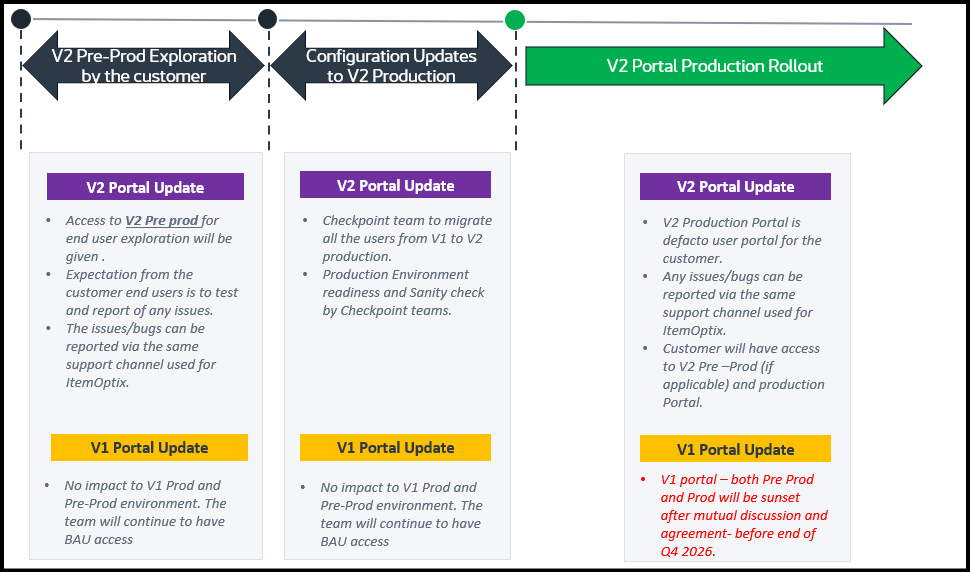
Milestone dates are indicative and will be finalized per customer during rollout communication.